
An effective healthcare website prioritizes patient trust, a single clear path to booking, accessibility, and secure intake, in that order. Check those four things first: does the booking flow take under three clicks, are provider credentials visible without a click, does the homepage load fast on a phone, and does every form protect sensitive data by design? Everything else in healthcare website design supports those priorities.
TL;DR:
- Nearly half of users abandon a healthcare booking page if it takes more than 90 seconds to complete on a mobile device.
- A website should load within 2.5 seconds for the largest content and use server-side rendering to help search engines index provider and condition content reliably.
- Building condition-specific pages and filtering options for providers improves user experience by reducing search frustration and choice paralysis.
- Accessibility and privacy must be integrated from the start, ensuring WCAG 2.2 AA compliance and encrypted data handling for intake forms.
- Regular, quarterly updates are critical for clinical content, provider information, and compliance policies to maintain trust and accuracy.
Table of Contents
- Healthcare Website Design Examples Worth Copying
- What Makes a Healthcare Website Trustworthy and Effective?
- Does My Healthcare Site Meet Accessibility and Privacy Standards?
- Which Technical Factors Affect Healthcare Site Rankings?
- How Should a Healthcare Site Connect to EHR and Scheduling Systems?
- How Do You Design a Healthcare Site for Multiple Languages and Cultures?
- How Often Should a Healthcare Website Be Updated?
- An Honest Look at How Design Trade-Offs Actually Play Out
- Ready to Fix Your Healthcare Website’s Priorities First?
- Sources
- FAQ
Healthcare Website Design Examples Worth Copying
The best healthcare website examples solve one problem clearly instead of trying to look impressive. Each pattern below has a specific job. Copy the structure, not the decoration.
- Homepage hero with a booking CTA above the fold. Solves the “what do I do first” problem. Structure to copy: headline naming the specialty, a single primary button, no carousel. Implementation note: keep the largest contentful paint under 2.5 seconds, since a slow hero kills the conversion it’s designed to drive.
- Condition-specific landing pages. Solves search intent for symptoms and treatments rather than services. Copy the pattern of one condition per URL with a plain-language summary, then a “when to see a doctor” section. This is also how Oak Theory frames the patient journey, building pages around what someone searches before they ever consider booking.
- Provider directory with filters by specialty and location. Solves choice paralysis in multi-provider practices. Copy the filter-plus-card layout with photo, credentials, and next available slot visible in the card itself.
- Telehealth landing page with a live availability widget. Solves the “is this actually available now” question. Copy the real-time slot display, not a generic “contact us” form.
- Individual provider bio pages. Solves the credibility gap. Copy the structure of degree, board certification, years in practice, and a short first-person note, all above the fold.
- Appointment booking flow with progressive steps. Solves form abandonment. Copy the pattern of asking for name and reason first, insurance and history later.
- FAQ modules embedded on service pages, not buried in a separate section. Solves patient uncertainty at the point of decision, a pattern supported by health communication research showing structured content reduces confusion and builds trust.
Use a template when the practice has a standard service line and a tight budget. Commission a custom build when the organization runs multiple specialties, complex scheduling, or existing EHR integrations that a template can’t accommodate.
What Makes a Healthcare Website Trustworthy and Effective?
Trust and conversion follow a predictable order. Fix these in sequence rather than all at once.
- Build information architecture around two entry points. Condition-first pages capture people researching symptoms; provider-first directories capture people who already have a referral or a name. Most sites only build the second and lose the larger search audience.
- Put named clinicians in front of every claim. A “Dr. Sarah Chen, MD, Board Certified in Internal Medicine” byline on a treatment page does more for credibility than any stock photo. SMPLY’s work with medical practices treats named, credentialed providers as a core deliverable, not a nice-to-have.
- Reduce booking to one obvious action per page. Every page should have exactly one primary CTA. Secondary links (insurance info, directions) belong below the fold.
- Ask for the minimum information up front. Don’t collect diagnosis details, medications, or insurance numbers on a public form before a patient has confirmed an appointment. Push sensitive fields into a secured post-booking step.
- Canonicalize before you expand content. Thin, duplicate condition pages hurt rankings more than having fewer, deeper ones. Cluster related conditions under a single authoritative page rather than spinning up a new URL for every symptom variation.
Pro Tip: Run a five-minute test: open your own booking page on a phone, time yourself from homepage to confirmed appointment. If it takes more than 90 seconds, a real patient will abandon it faster than you did.
Does My Healthcare Site Meet Accessibility and Privacy Standards?
Accessibility and privacy aren’t separate checklists from design. They’re baseline requirements, and both are cheaper to build in than to retrofit.
For WCAG 2.2 AA compliance, confirm:
- Color contrast ratio of at least 4.5:1 for body text
- Full keyboard navigation, including a visible focus state
- Descriptive form labels, not placeholder text alone
- Logical heading order (one H1 per page, nested H2s and H3s)
- A skip-to-content link before the navigation menu
For forms and intake, encrypt data in transit, minimize the sensitive fields captured on public pages, and route intake through server-side processing rather than client-side scripts that expose data in the browser. No platform is compliant by default. Compliance comes from how the practice implements and configures it, not from a badge on a vendor’s homepage.
Pro Tip: Vet any scheduling or form vendor’s data-handling terms before launch, not after a patient complains. A signed business associate agreement matters more than a polished interface.
Which Technical Factors Affect Healthcare Site Rankings?
Search engines and AI answer engines both reward speed, clarity, and structure. Neither rewards a beautiful site that loads slowly or hides content behind JavaScript.
- Target Core Web Vitals: LCP under 2.5 seconds, INP under 200 milliseconds, CLS under 0.1, tested on real mobile devices, not just desktop simulators.
- Use server-side rendering or pre-rendering for provider directories and condition libraries built on JavaScript frameworks, so crawlers and AI systems can actually index the content.
- Add structured data:
Organization,MedicalBusiness,Personfor providers, andServicefor treatments. Mark up FAQs with schema so they’re eligible for rich results. - Maintain one canonical URL per topic, build internal search, and cluster related conditions and treatments under shared navigation instead of scattering them across disconnected pages.
How Should a Healthcare Site Connect to EHR and Scheduling Systems?
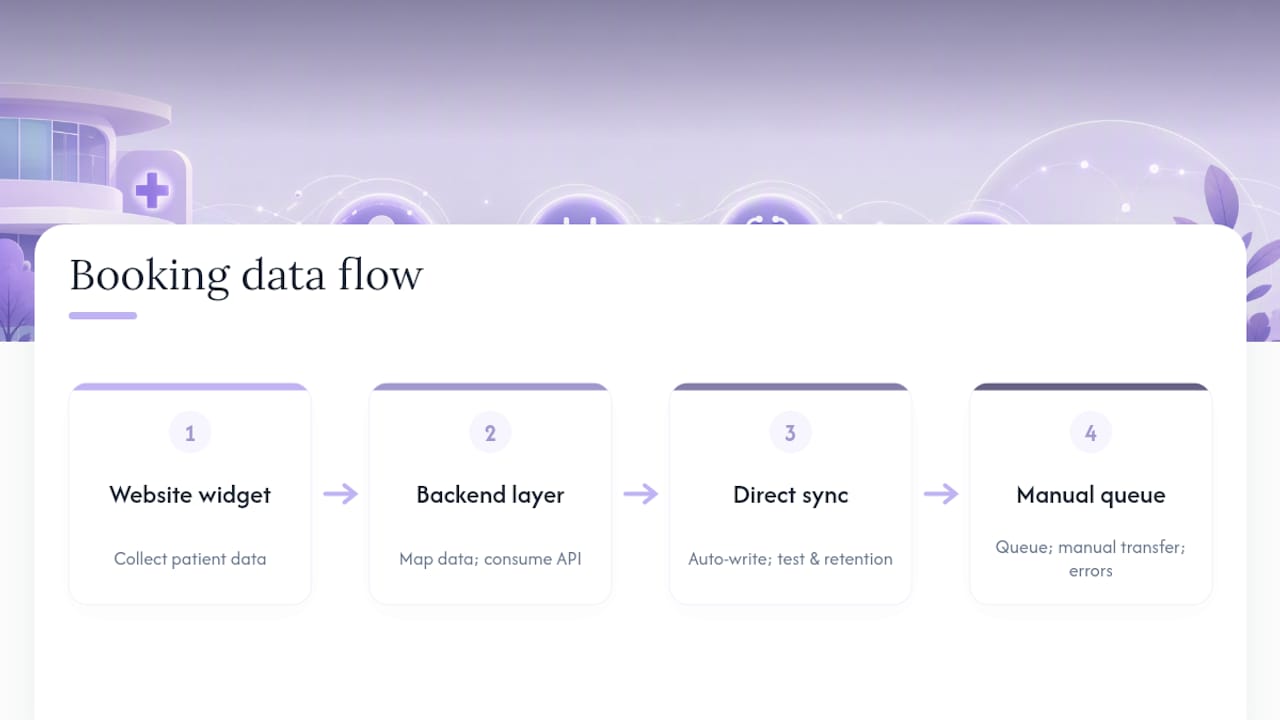
Integration is where most healthcare website projects quietly fail. A beautifully designed booking flow that doesn’t sync with the practice’s EHR just creates double data entry and scheduling conflicts.
Start by mapping the data flow before touching design. Does the booking widget write directly into the EHR’s scheduling module, or does it land in a separate queue that staff manually transfer? The second option introduces delay and human error, and patients notice when their confirmed slot doesn’t match what the front desk has on file.
Most EHR platforms and scheduling tools (Epic, Athenahealth, and similar systems commonly used across US clinics) expose APIs for real-time slot availability, but the integration quality depends entirely on how the website’s backend consumes that data. A static “book now” button that just emails a request isn’t integration, it’s a workaround.
Treat the connection to clinical systems as its own project phase, with its own data-mapping and testing timeline, separate from the visual design work. This is also where compliance and integration overlap directly: every data handoff between the website and the EHR is a point where patient information moves, and each handoff needs its own documented data flow and retention policy. Skipping that step is how practices end up with a booking form that looks compliant but isn’t, because nobody mapped what happens to the data after submission.
How Do You Design a Healthcare Site for Multiple Languages and Cultures?
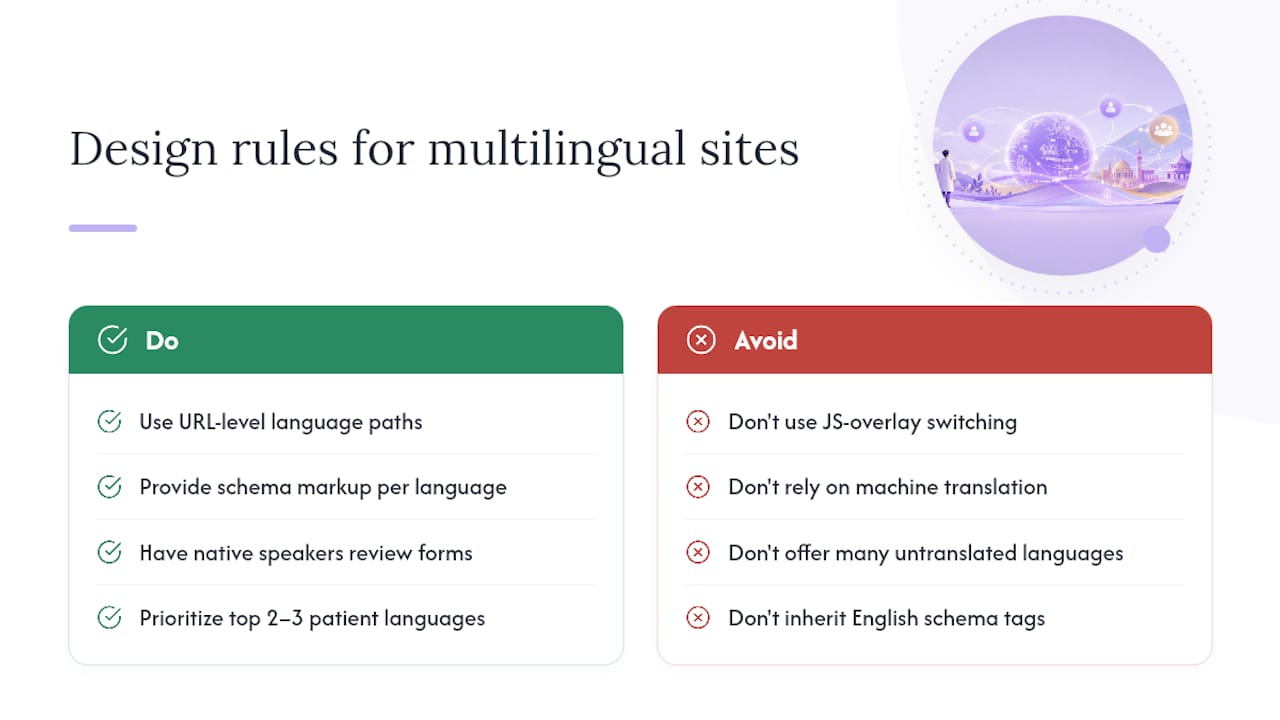
Multi-language support on a healthcare site is not a translation plugin bolted onto an English homepage. Patients researching a diagnosis in their second language need the same clarity, urgency cues, and trust signals as English speakers, not a machine-translated approximation of them.
Build language switching at the URL level (separate paths like /es/ rather than a JavaScript overlay) so search engines index each language version independently and so structured data and metadata translate along with the visible text. A condition page translated into Spanish should carry its own schema markup, not inherit the English version’s tags.
Cultural sensitivity goes beyond language. Imagery, color associations, and even the tone of urgency messaging (“see a doctor immediately” versus “consider scheduling a visit”) can land differently across cultural contexts. A clinic serving a large Vietnamese or Spanish-speaking population benefits from reviewing intake forms and consent language with native speakers who understand the practice’s specific patient base, not just a generic translation service.
Practically, prioritize the two or three languages that match the actual patient population data, rather than defaulting to a long list of options that get outdated and untranslated content within a year. A well-maintained two-language site beats a neglected five-language one every time.
How Often Should a Healthcare Website Be Updated?
Healthcare content decays faster than most industries realize. Insurance networks change, providers leave or join, treatment guidelines get revised, and a condition page written two years ago may reference outdated screening recommendations.
Set a quarterly review cycle for clinical content: condition pages, treatment descriptions, and FAQ modules. Assign each page an owner, ideally the clinician whose name appears on it, so updates carry the same credibility as the original content. Provider directories need faster turnaround. A departed physician still listed as “accepting new patients” erodes trust the moment a patient discovers it during a phone call.
Compliance content (privacy policies, consent language, accessibility statements) should get reviewed whenever the practice adds a new vendor, form, or integration, not just on a calendar schedule. A new scheduling widget or chat tool changes the data flow, and the privacy policy needs to reflect that change before launch, not months later.
Build a simple maintenance log, even a shared spreadsheet, tracking last-reviewed dates per page category. It’s unglamorous, but it’s the difference between a healthcare website design that stays trustworthy and one that quietly accumulates outdated claims until a patient or regulator catches it first.
An Honest Look at How Design Trade-Offs Actually Play Out
Uxui approaches healthcare projects by integrating product thinking with design execution, which means fewer handoffs between strategy, design, and build, and less drift from the original plan. A typical engagement moves through discovery and persona mapping, prototyping, an accessible design system, then implementation, each stage informing the next instead of getting reinterpreted by a new team.
The real trade-off is speed versus scale. A template gets a single-provider practice live in weeks. A multi-specialty organization with EHR integrations and accessibility requirements needs a custom system, and that budget should be set at the start, not discovered mid-project.
— uxui
Ready to Fix Your Healthcare Website’s Priorities First?
Most healthcare organizations don’t need a full rebuild. They need to know which of the four priorities, trust, booking, accessibility, or secure intake, is actually broken before spending on a redesign. Uxui’s Professional Website Audit does exactly that: a focused review that maps your current site against those priorities and flags what’s costing you patients before you commit to a rebuild.

If the audit turns up structural problems, the Audit + Redesign Concept builds a concrete plan around what patients actually need from your booking flow and content architecture, and Implementation carries that plan through to a working, accessible site. Practices that fit a more standardized service line can also look at OONA, a ready-made template built for dental and healthcare-style practices, with customization available if the base structure needs adjusting.
Start with the audit. It costs less than guessing wrong on a full redesign, and it tells you exactly where your site loses patients.
Sources
- Healthcare Website Design | Oak Theory
- Medical Website Design for Doctors, Clinics & Healthcare Practices | SMPLY
- PMC article (health communication / design findings)
FAQ
What Is the Most Important Element of Healthcare Website Design?
A clear, single-click path to booking matters most, since patients who can’t find or complete an appointment quickly leave for a competitor’s site regardless of how polished the design looks.
Is a Website HIPAA Compliant Just by Using a Certain Platform?
No platform is HIPAA compliant by default. Compliance depends on secure implementation, server-side handling of intake forms, encrypted data transit, and vetted vendor contracts.
Should I Use a Template or a Custom Build for My Clinic’s Website?
A template works well for a single-specialty practice with straightforward scheduling needs, while a custom build makes sense for multi-specialty organizations with EHR integrations, complex accessibility requirements, or multi-language patient populations.
How Much Does a Professional Healthcare Website Audit Cost?
A professional website audit identifies the specific gaps in trust, booking flow, accessibility, and intake security before you invest in a redesign. Current prices are available on the provider’s pricing page.
How Often Should Provider Directories Be Updated?
Provider directories need updates as soon as a clinician’s status changes, since an outdated “accepting new patients” listing damages trust the moment a patient calls to book and finds it inaccurate.